The cheapest card machine in the UK depends on how much you take each month. This guide compares eight providers using published 2026 prices, then works out the real first-year cost at four turnover levels, so you can pick the right one without paying hidden extras.
Quick Answer: What Is the Cheapest Card Machine in the UK?
There is no single cheapest card machine. The lowest-cost option changes with your monthly card sales, your average sale and the cards your customers use. Based on published prices checked on 28 October 2026:
- Cheapest hardware: Square Reader at £19 + VAT.
- Cheapest with no monthly fee and next-day payouts: SumUp Solo Lite (£25, 1.69%) and Square (£19, 1.75%).
- Lowest published rate: Lopay Essential at 0.79%, but only with slower Thursday payouts.
- Low rate with quicker payouts: Revolut Business (0.8% + 2p) and SumUp Payments Plus (0.99%), which suit higher turnover.
- Under about £2,700 a month: choose a no-monthly-fee reader (SumUp PAYG, Square, PayPal Reader).
- Over about £3,000 a month: a lower-rate plan (SumUp Payments Plus, Revolut, Lopay) usually costs less.
- Over £100,000 a year: ask for written quotes, because standard published rates may stop applying.
This guide is based on published provider pricing and comparison sources. We did not test the devices. Card fees and hardware offers change often, so check the provider’s pricing page before you buy. If you run one of the many small businesses in London or elsewhere in the UK, the tables below show what you would really pay.
Cheapest Card Machines UK at a Glance
| Provider | Device | Hardware | In-person fee | Monthly fee | Payout | Best for |
|---|---|---|---|---|---|---|
| Square | Reader | £19 + VAT | 1.75% | £0 | Free next day | Lowest upfront cost |
| SumUp | Solo Lite | £25 ex VAT | 1.69% (0.99% on Plus) | £0 (£19 on Plus) | Next day from 7am* | Low turnover, no contract |
| PayPal (Zettle) | PayPal Reader | From £29 ex VAT | 1.75% | £0 | Minutes to PayPal balance | PayPal users |
| Lopay | WisePad 3 | £35 | 0.79% to 1.79% | £0 | Thursday, next day or instant | Lowest rate, slower cash flow |
| myPOS | Go 2 | £29 to £39** | From 1.10% + 7p | £0 | Instant to myPOS account | Higher-value sales |
| Revolut Business | Reader | £49** | From 0.8% + 2p | £0 to £10** | Within 24 hours | Revolut users |
| Dojo | Go Max | £149 or £25/month | 1.2% + 3p to 5p | £0 (Essential) | Next working day by 10am | Cafés and shops |
| Teya | Teya Pro | £179 | 1.59% (consumer) | £0 above £2,500 sales, else £29.99 | 9am next day | Steady monthly sales |
*With a SumUp Business Account. **Sources disagree on this price, so confirm it at checkout. Headline rates can depend on card type, eligibility, turnover or payout plan. Prices checked 28 October 2026.
Upfront hardware price compared
Cheapest reader or terminal from each provider (£, ex VAT where stated)
Blue: small readers that pair with a phone. Grey: standalone terminals. myPOS and Revolut prices vary by source.
What “Cheapest” Really Means for a Card Machine
Many guides call a machine “cheapest” because of one number. That can mislead you. There are four different ways to be cheap:
- Lowest hardware price: good if you rarely take card payments.
- Lowest rate: good if you take a lot, but the rate may only apply to some cards.
- No monthly fee or contract: good for new, seasonal or part-time traders.
- Lowest first-year total: hardware, monthly fees and transaction fees added together. This is the fairest test, so it is the one we use below.
A cheap rate can still cost more overall. At £1,000 a month, SumUp’s £19 monthly plan costs about £144 more over the year than its pay-as-you-go plan, even though its rate is lower.
First-Year Cost at Four Turnover Levels
This is the most useful part of the guide. We worked out the first-year cost for each provider at four monthly card sales levels. Costs include the reader bought outright, any monthly fee and all transaction fees.
Assumptions: all sales are UK consumer Visa or Mastercard in person; no refunds, chargebacks or optional software; VAT excluded; Dojo is modelled with a 4p authorisation fee; myPOS uses £39 hardware; Revolut uses a £49 reader plus a £10 monthly plan (the safer reading of conflicting sources). Lopay Essential assumes you accept Thursday payouts.
£1,000 a month (£10 average sale)
| Provider and plan | First-year cost | Cost per £100 taken |
|---|---|---|
| Lopay Essential | £129.80 | £1.08 |
| Lopay Standard | £153.80 | £1.28 |
| SumUp PAYG | £227.80 | £1.90 |
| Square | £229.00 | £1.91 |
| PayPal Reader | £239.00 | £1.99 |
| myPOS Go 2 | £255.00 | £2.13 |
| Revolut Business | £289.00 | £2.41 |
| Dojo Go Max | £341.00 | £2.84 |
| SumUp Payments Plus | £371.80 | £3.10 |
| Teya Pro | £729.68 | £6.08 |
Verdict: at low turnover, avoid monthly plans. Lopay is cheapest if weekly payouts suit you. Otherwise SumUp PAYG and Square are close, and Square’s £19 reader is slightly cheaper to buy. For anything you need to budget in your financial planning, these fixed costs are the ones to watch.
£3,000 a month (£30 average sale)
| Provider and plan | First-year cost | Cost per £100 taken |
|---|---|---|
| Lopay Essential | £319.40 | £0.89 |
| Lopay Standard | £391.40 | £1.09 |
| Revolut Business | £481.00 | £1.34 |
| myPOS Go 2 | £519.00 | £1.44 |
| SumUp Payments Plus | £609.40 | £1.69 |
| Dojo Go Max | £629.00 | £1.75 |
| SumUp PAYG | £633.40 | £1.76 |
| Square | £649.00 | £1.80 |
| PayPal Reader | £659.00 | £1.83 |
| Teya Pro | £751.40 | £2.09 |
Cost of taking £100 in card payments
First-year cost per £100 taken at £3,000 monthly card sales (lower is cheaper)
Green: needs slower payouts (Thursday or next working day). Source: our calculation from published rates, 28 October 2026.
Verdict: the gap between providers starts to show. SumUp Payments Plus now just beats SumUp PAYG, and Revolut and myPOS pull ahead of the flat-rate readers.
£10,000 a month (£50 average sale)
| Provider and plan | First-year cost | Cost per £100 taken |
|---|---|---|
| Lopay Essential | £983 | £0.82 |
| Revolut Business | £1,177 | £0.98 |
| Lopay Standard | £1,223 | £1.02 |
| SumUp Payments Plus | £1,441 | £1.20 |
| myPOS Go 2 | £1,527 | £1.27 |
| Dojo Go Max | £1,685 | £1.40 |
| SumUp PAYG | £2,053 | £1.71 |
| Teya Pro | £2,087 | £1.74 |
| Square | £2,119 | £1.77 |
| PayPal Reader | £2,129 | £1.77 |
Verdict: flat-rate readers now cost roughly £900 to £1,150 more a year than the lowest options. Moving to a lower-rate plan is worth it here.
£25,000 a month (£100 average sale)
| Provider and plan | First-year cost | Cost per £100 taken |
|---|---|---|
| Lopay Essential | £2,405 | £0.80 |
| Revolut Business | £2,629 | £0.88 |
| Lopay Standard | £3,005 | £1.00 |
| SumUp Payments Plus | £3,223 | £1.07 |
| myPOS Go 2 | £3,549 | £1.18 |
| Teya Pro | £4,949 | £1.65 |
| SumUp PAYG | £5,095 | £1.70 |
| Square | £5,269 | £1.76 |
| PayPal Reader | £5,279 | £1.76 |
| Dojo | Custom quote needed (published 1.2% applies under £100,000 a year) | |
Verdict: at this level, ask for quotes. Dojo’s standard 1.2% does not apply above £100,000 a year, and Square offers custom pricing above £200,000 a year in card sales, so the standard 1.75% may not be what you would pay.
When does SumUp Payments Plus beat pay-as-you-go?
Payments Plus cuts the rate from 1.69% to 0.99%, a saving of 0.70%. It costs £19 a month, so it only pays for itself once you take about £2,700 a month (£19 ÷ 0.007) in eligible UK consumer cards. Amex, corporate and international cards stay at 1.69%, so your real break-even point may be higher.
Where the money goes: SumUp Payments Plus at £3,000 a month
First-year cost of £609.40 split by type
- Transaction fees: £356.40 (58.5%)
- Monthly plan: £228.00 (37.4%)
- Hardware: £25.00 (4.1%)
The Cheapest Card Machines Reviewed
1. Square Reader – Cheapest Hardware

Image source: startups.co.uk
- Cost: Reader £19 + VAT; Terminal £149 + VAT.
- Fees: 1.75% for UK cards in person. Cards from outside the UK add 1.5%. Keyed-in payments cost 2.5%.
- Monthly fee and contract: £0, no contract on the standard plan.
- Payout: free next-day transfers. Instant transfers cost extra.
- Watch out for: the Reader needs a phone or tablet, and tourist-heavy shops will pay more on non-UK cards.
2. SumUp – Best for Low Turnover and No Contract

Image source: robertdyas.co.uk
- Cost: Solo Lite £25, Solo £79, Solo with printer £109, Terminal £135. SumUp’s sources conflict on whether these include VAT, so check at checkout.
- Fees: 1.69% pay as you go on every in-person card, including Amex. Payments Plus (£19 a month or £189 a year) charges 0.99% on eligible UK consumer cards.
- Connectivity: Solo Lite pairs with a phone. Solo has a built-in SIM with free mobile data. Terminal has Wi-Fi and free 4G.
- Payout: next day from 7am, including weekends, with a SumUp Business Account.
- Watch out for: online payments cost 2.50%, and the Plus rate does not cover Amex, corporate or international cards.
3. PayPal Reader (Formerly Zettle) – Best for PayPal Users

Image source: expertmarket.co.uk
- Cost: Reader from £29 ex VAT, but only one per new eligible business. Extra readers cost £69. Terminal from £149.
- Fees: flat 1.75% on all cards, including Amex. No monthly fee.
- Payout: to your PayPal balance within minutes, then on to your bank.
- Watch out for: the £29 price is a new-customer offer, not the standard price.
4. Lopay – Lowest Published Rate
- Cost: WisePad 3 at £35 for the first device (£49 online). Business Terminal £270, or £15 a month.
- Fees: the rate depends on how fast you want paying.
| Lopay plan | Rate | Payout |
|---|---|---|
| Essential | 0.79% | Thursday |
| Standard | 0.99% | Next working day |
| Instant to Bank | 1.79% | 24/7 |
Amex, corporate and international cards add 1%. Tap to Pay adds 8p per transaction. Waiting until Thursday for your money can leave a gap in cash flow, which is why some traders keep a business line of credit as a back-up.
5. myPOS – Best for Higher-Value Sales
- Cost: Go 2 at £29 or £39 depending on the source. Ultra £229 + VAT.
- Fees: from 1.10% + 7p on UK consumer cards, up to 2.85% + 7p on other cards. No monthly fee.
- Payout: instant to a myPOS account.
- Watch out for: the 7p fixed fee hurts on small sales (see the worked example below).
6. Revolut Business – Low Rate for Existing Users
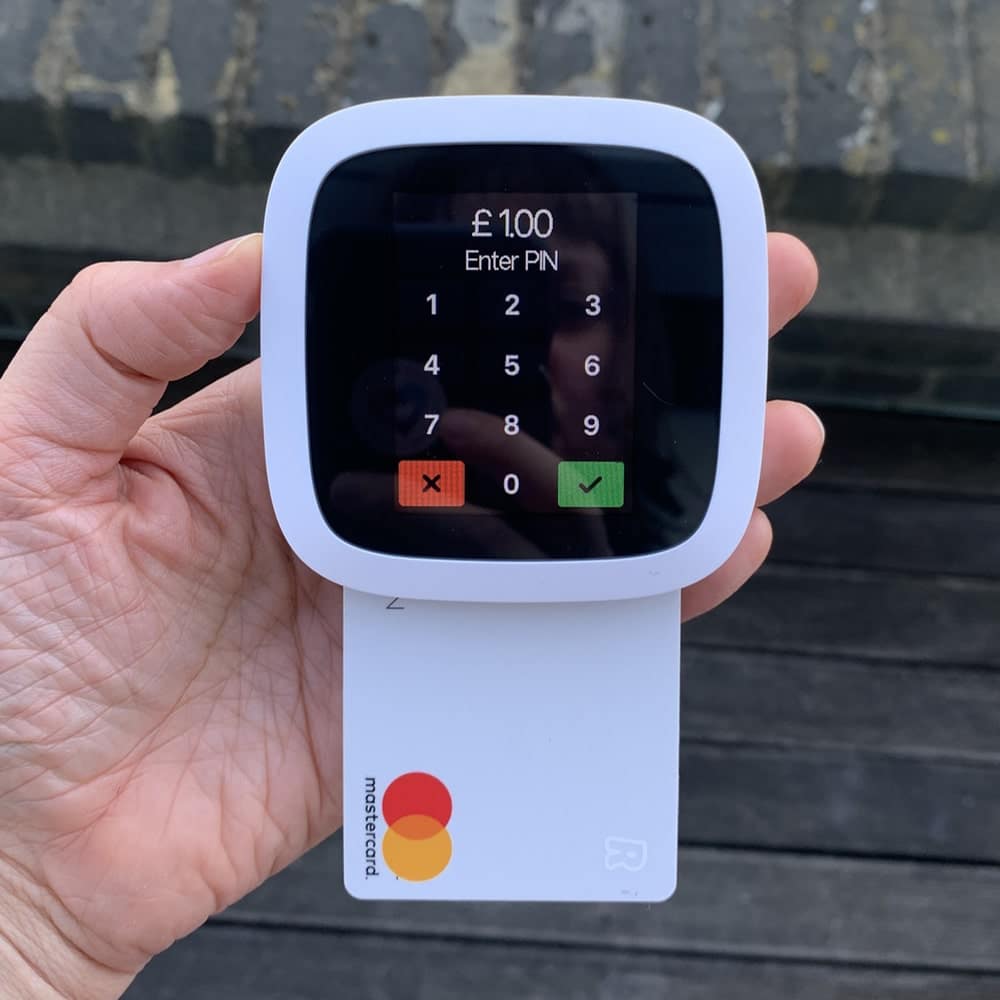
Image source: mobiletransaction.org
- Cost: Reader £49, Lite Terminal £129 + VAT, Terminal £169 + VAT (sources differ, so confirm in Revolut’s store).
- Fees: from 0.8% + 2p on UK consumer Visa and Mastercard. Amex costs 1.7% and other cards 2.6%.
- Monthly fee: sources say anything from £0 to £10. Check the plan before you sign up.
- Payout: within 24 hours.
7. Dojo – Best for Cafés and Shops
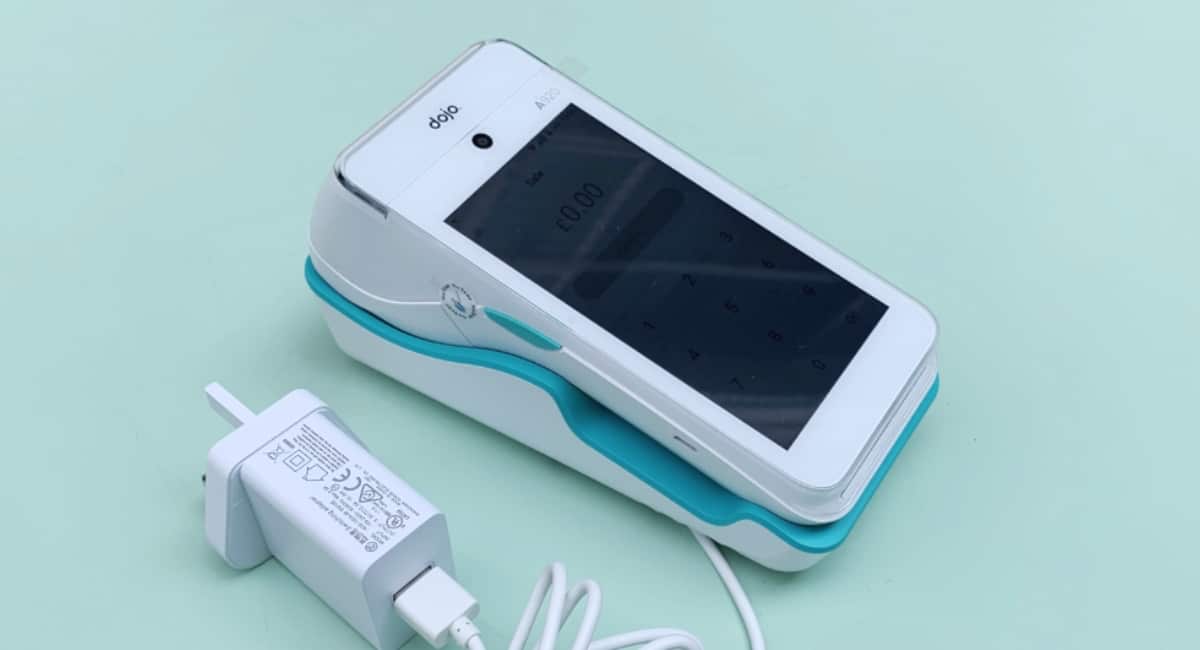
Image source: mobiletransaction.org
- Cost: Go Max £149 or £25 a month. Pocket £239 or £20 a month. Wired £179 or £15 a month.
- Fees: 1.2% blended under £100,000 a year in card sales, plus 3p to 5p per transaction. Essential plan £0 a month.
- Contract: 30-day rolling or 12-month fixed, depending on plan.
- Payout: next working day by 10am.
8. Teya – Best for Steady Monthly Sales
- Cost: Teya Pro £179.
- Fees: 1.59% on consumer Visa and Mastercard; 1.90% on business, international and Amex cards, up to £7,500 monthly turnover.
- Monthly fee: £0 if you take £2,500 or more a month, otherwise £29.99.
- Payout: 9am next day, including weekends.
Other providers to check
- Tyl by NatWest: rental from £13.99 + VAT a month and a published 1.39% + 5p on UK and European personal cards. Rental makes it poor value at low turnover (see the £1,000 example earlier).
- Flatpay: advertises 1.49% and a free-to-start terminal. Check the minimum term and return rules.
- Stripe: mainly an online option, so it suits those who start an e-commerce business and add in-person sales later.
- Worldpay, Barclaycard Payments and Clover: quote-based or rental. Compare them only with a written quote.
Why Fixed Fees Matter on Small Sales
A fee like “1.10% + 7p” looks tiny, but the 7p is the same on a £5 coffee as on a £100 job. Here is what you really pay as a percentage of each sale:
| Provider and rate | £5 sale | £20 sale | £100 sale |
|---|---|---|---|
| Lopay Essential (0.79%) | 0.79% | 0.79% | 0.79% |
| Revolut (0.8% + 2p) | 1.20% | 0.90% | 0.82% |
| myPOS (1.10% + 7p) | 2.51% | 1.45% | 1.17% |
| Dojo (1.2% + 4p) | 2.00% | 1.40% | 1.24% |
| Tyl (1.39% + 5p) | 2.39% | 1.64% | 1.44% |
| SumUp PAYG (1.69%) | 1.69% | 1.69% | 1.69% |
| Square or PayPal (1.75%) | 1.75% | 1.75% | 1.75% |
For small sales such as coffees or market stall items, a flat percentage is often cheaper than a percentage plus a fixed fee. For larger jobs, the fixed fee barely matters.
Cheapest Card Machine by Business Type
| Business | What matters most | Options to compare |
|---|---|---|
| Sole trader or startup | Low upfront cost, no contract | Square, SumUp Solo Lite, PayPal Reader |
| Market trader | Battery, mobile signal, small sales | SumUp Solo, Square Reader, PayPal Reader |
| Hairdresser or salon | Deposits, payment links | SumUp, Square, PayPal, Lopay |
| Food van | Fast contactless, 4G, printer | SumUp Solo or Terminal, myPOS |
| Taxi driver | Standalone device, quick payouts | myPOS, SumUp Solo, PayPal Terminal |
| Café or restaurant | Tips, printer, till link | Dojo, Square, Teya, SumUp Terminal |
| Small shop | Reliability, stock software | Dojo, Square, Teya |
For mobile traders, connectivity can matter more than a 0.1% rate difference. A phone-paired reader stops working if your phone loses signal, while SumUp Solo includes its own SIM. If you are making money with a van, a standalone device is usually the safer choice. The same goes for drivers who start a taxi business and need to take payment in the back seat.
Buy or Rent? Free Machines Explained
Buying outright is usually cheaper than renting. Using Dojo’s own pricing as an example:
| Dojo Go Max | After 12 months | After 36 months |
|---|---|---|
| Buy (£149) | £149 | £149 |
| Rent (£25 a month) | £300 | £900 |
“Free” machines are rarely free. Before you accept one, ask about the minimum term, any minimum monthly spend, whether you must return the terminal, and whether the rate rises later. Walk away from cold-call offers that tie you into a long contract.
Hidden Fees to Watch Out For
A low headline rate can hide extra charges. Ask for the full fee schedule in writing and check for:
- Chargeback fees: a penalty when a customer disputes a payment.
- Refund fees: some providers keep their fee when you refund.
- Card-type surcharges: Amex, corporate and international cards often cost more than the headline rate.
- PCI, gateway, statement and minimum monthly fees, mostly on traditional contracts.
- Early exit and terminal return charges on rented machines.
- Instant payout fees if you want your money faster.
- Rate rises after an introductory period or a turnover threshold.
We could not confirm chargeback fees for any provider in this guide, so check them directly before you sign up.
How Card Machine Fees Work in the UK
The fee a business pays to accept cards is called the merchant service charge. It is made up of three parts:
- Interchange fee: paid to the customer’s bank.
- Scheme fee: paid to Visa or Mastercard.
- Provider margin: what the card machine company keeps.
UK rules cap interchange on domestic consumer cards at 0.2% for debit and 0.3% for credit. These caps do not limit the total you are charged, according to the Payment Systems Regulator. That is why rates vary so much between providers.
| Pricing model | How it works | Examples |
|---|---|---|
| Flat rate | One percentage for every card | SumUp PAYG, Square, PayPal |
| Blended | One combined rate, sometimes plus a fixed fee | Dojo |
| Interchange++ | Wholesale costs listed separately plus a markup; cheaper at high volume but harder to predict | Quote-based providers |
| Plan-based | Rate changes with plan, payout speed or turnover | Lopay, SumUp Plus, Teya |
On contactless, the UK card limit is £100 per payment, with a PIN needed once the running total passes £300. Apple Pay and Google Pay are not held to the £100 card limit. Since 19 March 2026 the FCA has allowed providers with strong fraud controls to change card limits, so these figures may shift.
How to Choose the Cheapest Machine for Your Business
- Work out your monthly card sales and average sale value.
- Check the rate for the cards your customers use, including Amex and international.
- Add hardware and monthly fees to get a first-year total, as in the tables above.
- Check payout speed and whether faster payouts cost extra.
- Check the contract length, exit costs and terminal return rules.
- Confirm you can use it where you trade: phone signal, battery and printing.
- Verify the provider on the FCA Financial Services Register and confirm prices on its own website.
How to Switch to a Cheaper Provider
Your current statements tell you what you pay now. Divide total fees by total card sales to get your effective rate, then compare it with the tables above. Before you leave, get the following in writing: your notice period, any early exit charge, whether you must return the terminal, and how your last payouts will be handled. Get quotes on equal terms so you compare like with like.
Which Card Machine Is Best Overall?
| If you want… | Choose |
|---|---|
| The cheapest hardware | Square Reader (£19 + VAT) |
| No monthly fee and next-day payouts | SumUp Solo Lite or Square |
| The lowest rate and can wait for payouts | Lopay Essential (0.79%) |
| A low rate on UK consumer cards | Revolut Business (0.8% + 2p) |
| A cheaper rate as sales grow | SumUp Payments Plus (above about £2,700 a month) |
| PayPal payouts | PayPal Reader |
| A card machine for a café or shop | Dojo or Teya |
| High turnover | Written quotes from several providers |
Whichever you choose, compare first-year total costs rather than the headline rate, and check the latest fees on the provider’s website before you sign up. For more business and finance guides, visit The London Report.
Read Also: Impact of Small Businesses in London’s Economy: A Dynamic Force
FAQs
1. What is the cheapest card payment machine in the UK?
It depends on your sales. For low turnover with no monthly fee, SumUp Solo Lite (£25) and Square Reader (£19 + VAT) are the cheapest to start. At higher turnover, lower-rate options such as Lopay, Revolut and SumUp Payments Plus cost less overall.
2. Which card reader has the lowest transaction fee?
Lopay Essential has the lowest published rate at 0.79%, but it pays out on Thursdays and Amex, corporate and international cards cost 1% more. Revolut charges from 0.8% + 2p on UK consumer Visa and Mastercard.
3. Are there card machines with no monthly fee?
Yes. SumUp pay as you go, Square, PayPal Reader, myPOS and Lopay all have no monthly fee on their standard plans. Teya also drops its fee if you take £2,500 or more a month.
4. Can I get a card machine without a contract?
Yes. SumUp, Square, PayPal Reader and myPOS advertise no contract. Always read the terms to check cancellation and terminal return rules.
5. What is the cheapest card machine for a sole trader?
Square Reader or SumUp Solo Lite, because they have low upfront costs, no monthly fee and no contract.
6. Which card machine is best for market traders?
A phone-paired reader (Square, SumUp Solo Lite, PayPal Reader) is cheapest. A standalone device such as SumUp Solo works better if you cannot rely on your phone’s signal or battery.
7. Is SumUp cheaper than Square or PayPal Reader?
Slightly. SumUp charges 1.69% against 1.75% for both Square and PayPal. At £10,000 a month, that is about £72 a year less. Square’s hardware is £6 cheaper.
8. Are free card machines really free?
Often not. They can come with a minimum term, a minimum monthly spend, a return requirement or a higher rate. Ask for the full terms first.
9. Do I need a business bank account to use a card machine?
It depends on the provider. Revolut’s reader needs a Revolut Business account, myPOS pays into a myPOS account, and PayPal pays into a PayPal balance, so check where your money lands.
10. Which card machine has next-day settlement?
Square, SumUp (with a Business Account), Dojo and Teya all pay next day. myPOS and PayPal Reader are faster but pay into their own accounts first.
11. Are there extra charges for Amex or international cards?
Often yes. Revolut charges 1.7% for Amex and 2.6% for other cards, Lopay adds 1%, and Square adds 1.5% on non-UK cards. SumUp pay as you go and PayPal charge one flat rate.